
14 KiB
| layout | title | permalink | description | nav_order |
|---|---|---|---|---|
| default | Command List | /commands | The full list of all commands in PluralKit, and a short description of what they do. | 3 |
How to read this
Words in <angle brackets> or [square brackets] mean fill-in-the-blank. Square brackets mean this is optional. Don't include the actual brackets.
Special arguments
Some arguments indicate the use of specific Discord features. These include:
@mention: insert a Discord mention (or "ping")
::: details Mention example
 :::
:::
reply: reply to a previous message
::: details Message reply example
 :::
:::
upload: upload a file
::: details Upload example
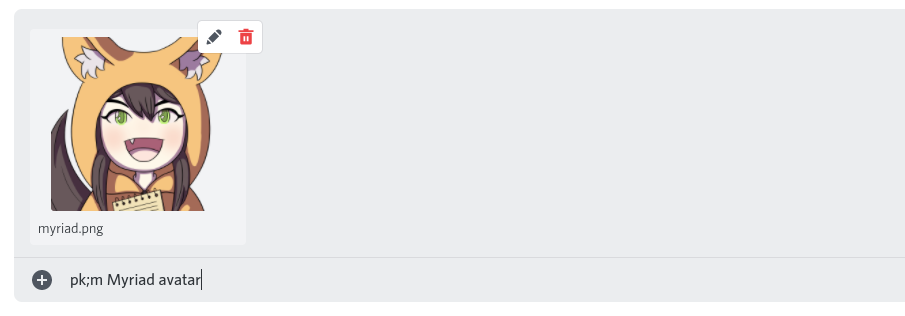 :::
:::
Non-prefixed commands
Some bot commands do not use the pk; prefix:
[tag]e.g.S: message- ifpk;system proxyis on, proxy this message, based on configured member proxy tags\- if autoproxy is enabled: as a one-off exception, don't proxy this message, without changing latch/switch/autoproxy\\- if autoproxy latch is enabled: don't proxy this message, and clear latch status, without disabling autoproxy
Commands
::: tip
You can have a space after pk;, e.g. pk;system and pk; system will do the same thing.
:::
System commands
To target a specific system, replace [system] with that system's 5 or 6 character ID, a Discord account ID, or a @mention - note that system names can not be used here. If no system ID is specified, defaults to targeting your own system. For most commands, adding -clear will clear/delete the field.
pk;system [system]- Shows information about a system.pk;system new [name]- Creates a new system registered to your account.pk;system [system] rename [new name]- Changes the name of your system.pk;system [system] servername [servername]- Changes the name of your system in the current server.pk;system [system] description [description]- Changes the description of your system.pk;system [system] avatar [avatar url|@mention|upload]- Changes the avatar of your system.pk;system [system] serveravatar [avatar url|@mention|upload]- Changes the avatar of your system in the current server.pk;system [system] banner [image url|upload]- Changes your system's banner image.pk;system [system] color [color]- Changes your system's color.pk;system [system] privacy- Displays your system's current privacy settings.pk;system [system] privacy <subject> <public|private>- Changes your systems privacy settings.pk;system [system] tag [tag]- Changes the system tag of your system.pk;system [system] servertag [tag|-enable|-disable]- Changes your system's tag in the current server, or disables it for the current server.pk;system [system] pronouns [pronouns]- Changes the pronouns of your system.pk;system proxy [server id] [on|off]- Toggles message proxying for a specific server.pk;system [system] delete- Deletes your system.pk;system [system] fronter- Shows the current fronter of a system.pk;system [system] fronthistory- Shows the last 10 fronters of a system.pk;system [system] frontpercent [timeframe]- Shows the aggregated front history of a system within a given time frame.pk;system [system] list- Shows a paginated list of a system's members.pk;system [system] list -full- Shows a paginated list of a system's members, with increased detail.pk;find <search term>- Searches members by name.pk;system [system] find <search term>- (same as above, but for a specific system)pk;system [system] random [-group]- Shows the info card of a randomly selected member [or group] in a system.pk;system [system] id- Prints a system's id.
Member commands
Replace <member> with a member's name, 5 or 6 character ID, or display name. For most commands, adding -clear will clear/delete the field.
pk;member <member>- Shows information about a member.pk;member new <name>- Creates a new system member.pk;member <member> rename <new name>- Changes the name of a member.pk;member <member> displayname <new display name>- Changes the display name of a member.pk;member <member> servername <new server name>- Changes the display name of a member, only in the current server.pk;member <member> description [description]- Changes the description of a member.pk;member <member> avatar [avatar url|@mention|upload]- Changes the avatar of a member.pk;member <member> proxyavatar [avatar url|@mention|upload]- Changes the avatar used for proxied messages sent by a member.pk;member <member> serveravatar [avatar url|@mention|upload]- Changes the avatar of a member in a specific server.pk;member <name> banner [image url|upload]- Changes the banner image of a member.pk;member <member> privacy- Displays a members current privacy settings.pk;member <member> privacy <subject> <public|private>- Changes a members privacy setting.pk;member <member> proxy [tags]- Changes the proxy tags of a member. use below add/remove commands for members with multiple tag pairs.pk;member <member> proxy add [tags]- Adds a proxy tag pair to a member.pk;member <member> proxy remove [tags]- Removes a proxy tag from a member.pk;member <member> autoproxy [on|off]- Sets whether a member will be autoproxied when autoproxy is set to latch or front mode.pk;member <member> keepproxy [on|off]- Sets whether to include a member's proxy tags in the proxied message.pk;member <member> serverkeepproxy [on|off|clear]- Sets whether to include a member's proxy tag in the proxied message in a specific server.pk;member <member> tts [on|off]- Sets whether to send a member's messages as text-to-speech messages.pk;member <member> pronouns [pronouns]- Changes the pronouns of a member.pk;member <member> color [color]- Changes the color of a member.pk;member <member> birthdate [birthdate|today]- Changes the birthday of a member.pk;member <member> delete- Deletes a member.pk;member <member> id- Prints a member's id.
Group commands
Replace <group> with a group's name, 5 or 6 character ID, or display name. For most commands, adding -clear will clear/delete the field.
pk;group <group>- Shows information about a group.pk;group new <name>- Creates a new group.pk;group list- Lists all groups in your system.pk;group <group> list- Lists all members in a group.pk;group <group> random- Shows the info card of a randomly selected member in a group.pk;group <group> rename <new name>- Renames a group.pk;group <group> displayname [display name]- Shows or changes a group's display name.pk;group <group> description [description]- Shows or changes a group's description.pk;group <group> add <member> [member 2] [member 3...]- Adds one or more members to a group.pk;group <group> remove <member> [member 2] [member 3...]- Removes one or more members from a group.pk;group <group> privacy <name|description|icon|visibility|metadata|all> <public|private>- Changes a group's privacy settings.pk;group <group> icon [icon url|@mention|upload]- Shows or changes a group's icon.pk;group <group> color [color]- Shows or changes a group's color.pk;group <group> random- Shows a random member from a group.pk;group <group> banner [image url|upload]- Shows or changes a group's banner image.pk;group <group> delete- Deletes a group.pk;group <group> id- Prints a group's id.
Switching commands
pk;switch [member...]- Registers a switch with the given members.pk;switch out- Registers a 'switch-out' - a switch with no associated members.pk;switch edit <member...|out>- Edits the members in the latest switch.pk;switch copy <member...>- Makes a new switch based off the current switch with the listed members added or removed.pk;switch move <time>- Moves the latest switch backwards in time.pk;switch delete- Deletes the latest switch.pk;switch delete all- Deletes all logged switches.
Autoproxy commands
pk;autoproxy off- Disables autoproxying for your system in the current server.pk;autoproxy front- Sets your system's autoproxy in this server to proxy the first member currently registered as front.pk;autoproxy latch- Sets your system's autoproxy in this server to proxy the last manually proxied member.pk;autoproxy \<member>- Sets your system's autoproxy in this server to proxy a specific member.
Config commands
pk;config timezone [location]- Changes the time zone of your system.pk;config ping <enable|disable>- Changes your system's ping preferences.pk;config autoproxy timeout [<duration>|off|reset]- Sets the latch timeout duration for your system.pk;config autoproxy account [on|off]- Toggles autoproxy globally for the current account.pk;config proxy case [on|off]- Toggles case sensitive proxy tags for your system.pk;config private member [on|off]- Toggles whether member privacy is automatically set to private for new members.pk;config private group [on|off]- Toggles whether group privacy is automatically set to private for new groups.pk;config show private [on|off]- Toggles whether private information is shown to linked accounts by default.pk;config proxy error [on|off]- Toggles whether to send an error message when proxying fails.pk;config split IDs [on|off]- Toggles whether to display 6-letter IDs with a hyphen, to ease readability.pk;config capitalize IDs [on|off]- Toggles whether to display IDs as capital letters, to ease readability.pk;config pad IDs [left|right|off]- Toggles whether to pad (add a space) 5-character IDs in lists.pk;config show color [on|off]- Toggles whether to show color codes in system/member/group cardspk;config proxy switch [new|add|off]- Toggles whether to log a switch whenever you proxy as a different member (or add member to recent switch in add mode).pk;config name format [format]- Changes your system's username formatting.pk;config server name format [format]- Changes your system's username formatting for the current server.
Server owner commands
(all commands here require Manage Server permission)
pk;serverconfig log cleanup [on|off]- Toggles whether to clean up other bots' log channelspk;serverconfig invalid command error [on|off]- Sets whether to show an error message when an unknown command is sentpk;serverconfig require tag [on|off]- Sets whether server users are required to have a system tag on proxied messagespk;serverconfig suppress notifications [always|never|match|invert]- Sets under which conditions proxied messages have push notifications suppressed (sent as@silentmessages). If set tomatchit will match the trigger message, and if set toinvertit will be suppressed if the trigger message is not suppressed and vice versa.pk;serverconfig log channel <channel>- Designates a channel to post proxied messages topk;serverconfig log channel -clear- Clears the currently set log channelpk;serverconfig log blacklist- Displays the current list of channels where logging is disabledpk;serverconfig log blacklist add all|<channel> [channel 2] [channel 3...]- Disables message logging in certain channelspk;serverconfig log blacklist remove all|<channel> [channel 2] [channel 3...]- Enables message logging in certain channelspk;serverconfig proxy blacklist- Displays the current proxy blacklistpk;serverconfig proxy blacklist add all|<channel> [channel 2] [channel 3...]- Adds certain channels to the proxy blacklistpk;serverconfig proxy blacklist remove all|<channel> [channel 2] [channel 3...]- Removes certain channels from the proxy blacklist
Utility
pk;message <message id|message link|reply>- Looks up information about a proxied message by its message ID or link.pk;invite- Sends the bot invite link for PluralKit.pk;import- Imports a data file from PluralKit or Tupperbox.pk;export- Exports a data file containing your system information.pk;debug permissions [server id]- Checks the given server's permission setup to check if it's compatible with PluralKit.pk;debug proxying <message link|reply>- Checks why your message has not been proxied.pk;edit [message link|reply] <new content>- Edits a proxied message. Without an explicit message target, will target the last message proxied by your system in the current channel. Does not support message IDs!pk;edit -regex [message link|reply] <regex>- Edits a proxied message using a C# regex. The given regex must be formatted like s|X|Y or s|X|Y|F, where | is any character, X is a regex pattern, Y is a substitution string, and F is a set of flags.pk;reproxy [message link|reply] <member name|ID>- Reproxies a message using a different member. Without an explicit message target, will target the last message proxied by your system in the current channel. Only works on the last message, or within 1 minute of the proxied message being sent. Doesn't work on a non-proxied message.pk;link <account>- Links your system to a different account.pk;unlink [account]- Unlinks an account from your system.pk;random [-group]- Shows the card of a random member or group from your system.
API
(for using the PluralKit API, useful for developers)
pk;token- DMs you a token for using the PluralKit API.pk;token refresh- Refreshes your API token and invalidates the old one.pk;s webhook [url]- Shows or updates the dispatch webhook URL for your system.
Help
pk;help- Displays a basic help message describing how to use the bot.pk;help proxy- Directs you to this page.pk;system help- Lists system-related commands.pk;member help- Lists member-related commands.pk;switch help- Lists switch-related commands.pk;commands- Shows inline command documentation, or directs you to this page.